 monkeys
LLMs read .env, not anymore.
No one has to, but cat .env is just too tempting, and once it's in the
transcript, it's there for good.
The usual ways to live with that:
- Ignore it.
- Trust the provider.
- Rotate the key after it leaks.
Someone will call it a skill issue. It isn't. There has never been a safe way for the people on a project to share a secret and use it, so it went in a file. C had a memory problem too, and being careful didn't fix it. Rust did.
monkeys keeps each secret in your keyring and hands it to one command at a
time. Nothing prints a stored value, the command you hand it to included, so there is
nothing to read.
Install
One binary, no runtime. The script picks the build for your machine, checks the published
checksum, and puts it in ~/.local/bin; Homebrew upgrades it along with
everything else.
For a coding agent, install the skill as well. It is what makes the agent reach for monkeys on its own instead of asking you to paste a key; a key it needs but
you have not stored comes back as a message that says what to ask you for.
The plugin follows the Agent Plugins layout, and the third tab is the one file any other agent needs, in whatever directory it reads skills from.
Store a key once
Paste it at the prompt. It goes into the keychain on macOS and the Secret Service on Linux, and nothing you type lands in your shell history.
Spend it on one command
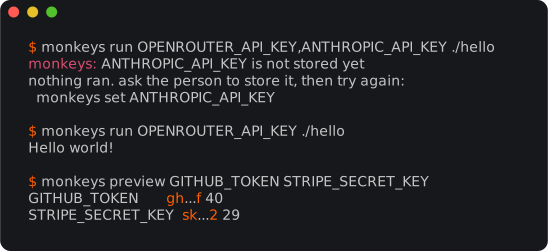
Name what the command reads, then the command, written the way you always write it. run puts the value in that one process and becomes it.
The key went into the request and the status came back. Nothing else did. The single quotes
matter: the shell run starts is the one that has the value, so it has to be the
one that expands $OPENROUTER_API_KEY.
Let the project name what it needs
A .monkeys file next to the code lists the names, under a profile. Commit it. In
that directory, run takes only the command, and the script reads the variable
the way any program does.
.monkeysA profile line can name several profiles, and a file can hold several blocks. A profile's
names are those of every block that lists it; the first profile in the file is the one run uses when none is given, and one the file does not declare is refused. A
prefix that fits only one declared profile is enough, the way a short git hash is.
.monkeysA value missing in one profile stops that profile alone, and only when it is used. doctor reads the whole file:
Hand the profile to a teammate
pack asks for a passphrase and writes foo.monkeys: the profile, its
names and its values, sealed. Send the file however you like, and the passphrase another way.
On the other machine, unpack asks for the passphrase, stores the values, and
writes .monkeys at the root of the checkout, wherever inside it you run it.
That is the only way a value leaves the keyring.